What are variances?
Variances are configurable labels for recording activities in employee records, such as absence and overtime.
The use of variances results in changes to an employee’s availability to work. Variances can be tracked using accounts, for example an account of 'Annual Hours' linked to a variance of 'Additional Hours' ensures an accurate log of hours worked.
Note: Full day and multi day holidays and any absences are transferred between published calendars. All other variances are lost if a calendar is republished.
Variances are split into:
Variance Types
There are 6 types of variance:
 Holiday
A Holiday is usually a planned activity which draws from an accrued entitlement. When a holiday variance is added to an employee they are not at work. Their time does not contribute to the overall shift cover or their working hours.
 Absence
Absence is commonly used to label sickness as well as other exceptions from work, such as parental leave and medical appointments.
When an absence variance is added to an employee they are not at work. Their time does not contribute to the overall shift cover or their working hours.
Absences are often not associated to any entitlement, however they can still be tracked in accounts.
 Shift Swap
A Shift Swap is used when two employees agree to exchange their working, or non-working, days to attain a more preferable shift. This does not have any effect on the overall cover provided by the workforce as the total shift cover remains the same.
The shifts swapped by employees may be different (swapping a 10 hour night shift with a 9 hour day shift) but the net result is the same (19 hours of shift cover).
 Additional Hours
An Additional Hours variance is attached to the beginning or the end of an attendance to reflect the fact that an employee has worked (or will be working) extra hours on a shift.
The time of the additional hours contributes to the overall shift cover provided by the employee on the day of the shift. So an employee working 2 hours overtime at the end of their 7 hour shift provides a total of 9 hours of cover on the shift.
 Shift Change
A Shift Change is used to give the employee a completely new shift on the day(s) affected. This could result in a:
- Different start/end time.
- Different shift name.
- Shift on a day when the employee was previously scheduled as a rest day.
- Rest day on a day when the employee was previously scheduled to work a shift.
This will usually effect a change in shift cover as a new shift time is allocated. The time of the shift change is the difference between the duration of the original shift and the duration of the new shift.
 Other Event
The Other Event or Miscellaneous variance is useful for adding breaks which are not classed as Holiday or Absence. For example, a regulation break between shifts or a training course. This ensures that the employee is not showing as available for work.
When the Other Event variance is added to an employee they are not at work. Their time does not contribute to the overall shift cover or their working hours.
Variance Categories
Within each variance type there can be any number of variance categories.
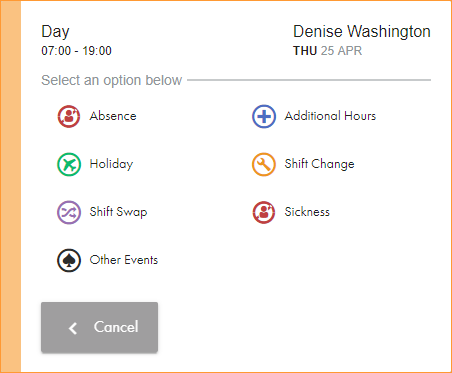
Categories are used to group different variance reasons and effect the options available to a user when selecting the Make a change option on a shift. This is to ease navigation for the user:
Variance Reasons
Within each variance category there can be one or many variance reasons.
These are the actual reasons for changing an employee's working time. Variance reasons can be selected after choosing the relevant variance category from the Make a Change form.
Note: Variance categories which only have a single reason listed have that variance reason automatically selected when choosing that category in the Make a Change form. A variance reasons popup window is not displayed.
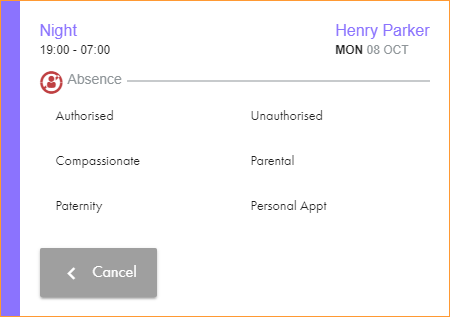
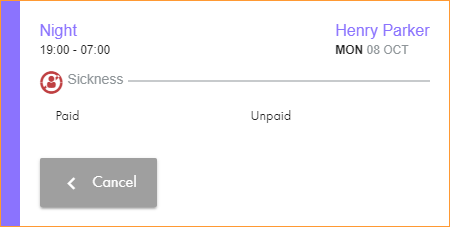
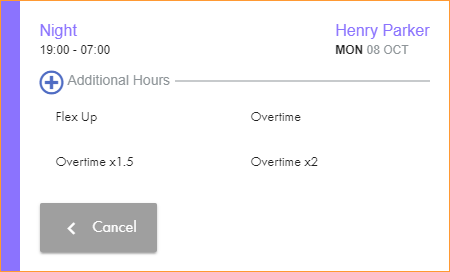
In this example, the categories and reasons are set up and displayed as follows (click on variance categories to display examples of variance reason lists):
| Variance Type | Variance Categories | Variance Reasons |
|---|---|---|
| Absence | Authorised, Unauthorised, Compassionate, Parental, Paternity, Personal Appt. | |
| Paid, Unpaid. | ||
| Additional Hours | Flex Up, Overtime, Overtime x1.5, Overtime x2. | |
| Holiday | Holiday | Holiday |
| Shift Change | Shift Change | Shift Change |
|
Shift Swap |
Shift Swap | Shift Swap |
| Other Event | Other Event | Training, Meeting |
 Absence